
Usage Dashboard
Understand how to read your organization's usage dashboard.
Your organization's usage dashboard gives you a centralized view of how much of each quota has been used, how much remains, and when each quota refreshes, giving full visibility into your organization's total usage.
To open the usage dashboard, click the app launcher in the top navigation bar, then select Account & Usage. From the left menu, go to Usage Dashboard.
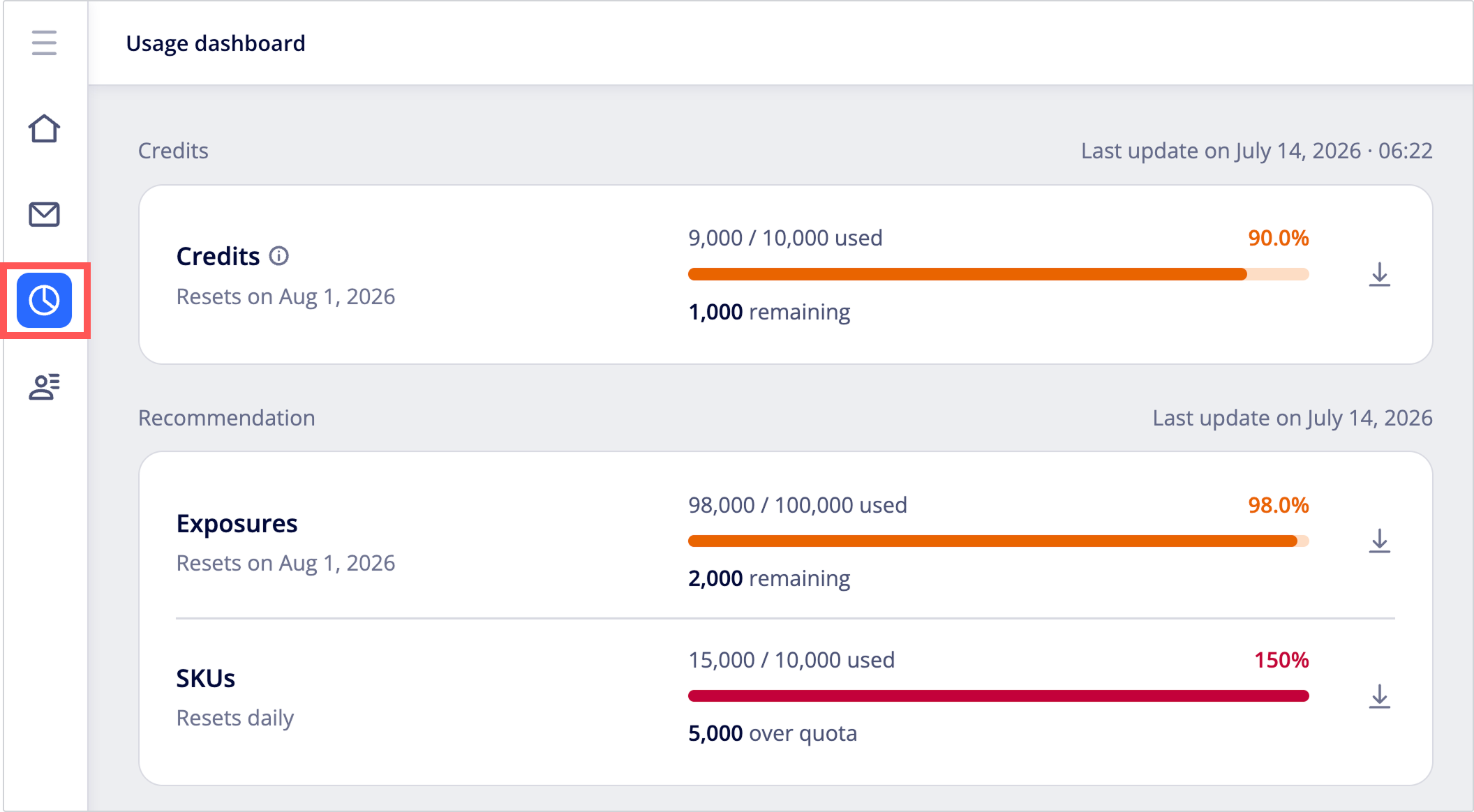
You'll see a section for each quota type which displays usage summaries for each type of quota, for example, quotas for credits or events. Each quota is measured and refreshed independently.
| Section | Metrics | When quota is used | Data refresh period |
|---|---|---|---|
| Credits | Credits | Each time a credit-charged operation executes. See Credit Usage for credit costs per operation. | 15 minutes to 2 hours |
| Users & data | Monthly active users | Each time a user triggers or receives a qualifying whitelisted event, for example, opening an email, visiting a page, or launching an app. | Monthly |
| Recommendation | Exposures, SKUs | Exposures: Each time recommendations are requested. SKUs: Usage is calculated based on the number of items (rows) in your data feed. | Exposures: Daily SKUs: Daily |
| Channels | Per-channel message usage for WhatsApp, SMS OTP, App push, Web push, Email, SMS credits, Viber, LINE LON, Kakao Sangdam Talk | Each time a message is sent. | SMS OTP: Monthly All other channels: Daily |
Frequently asked questionsFor answers to common issues and questions about Appier console billing and usage, see the FAQs.
How to read the dashboard
Each metric has its own quota usage bar displaying how much quota you've used so far and how much remains. At the top of each section, you can see when the data was last refreshed.
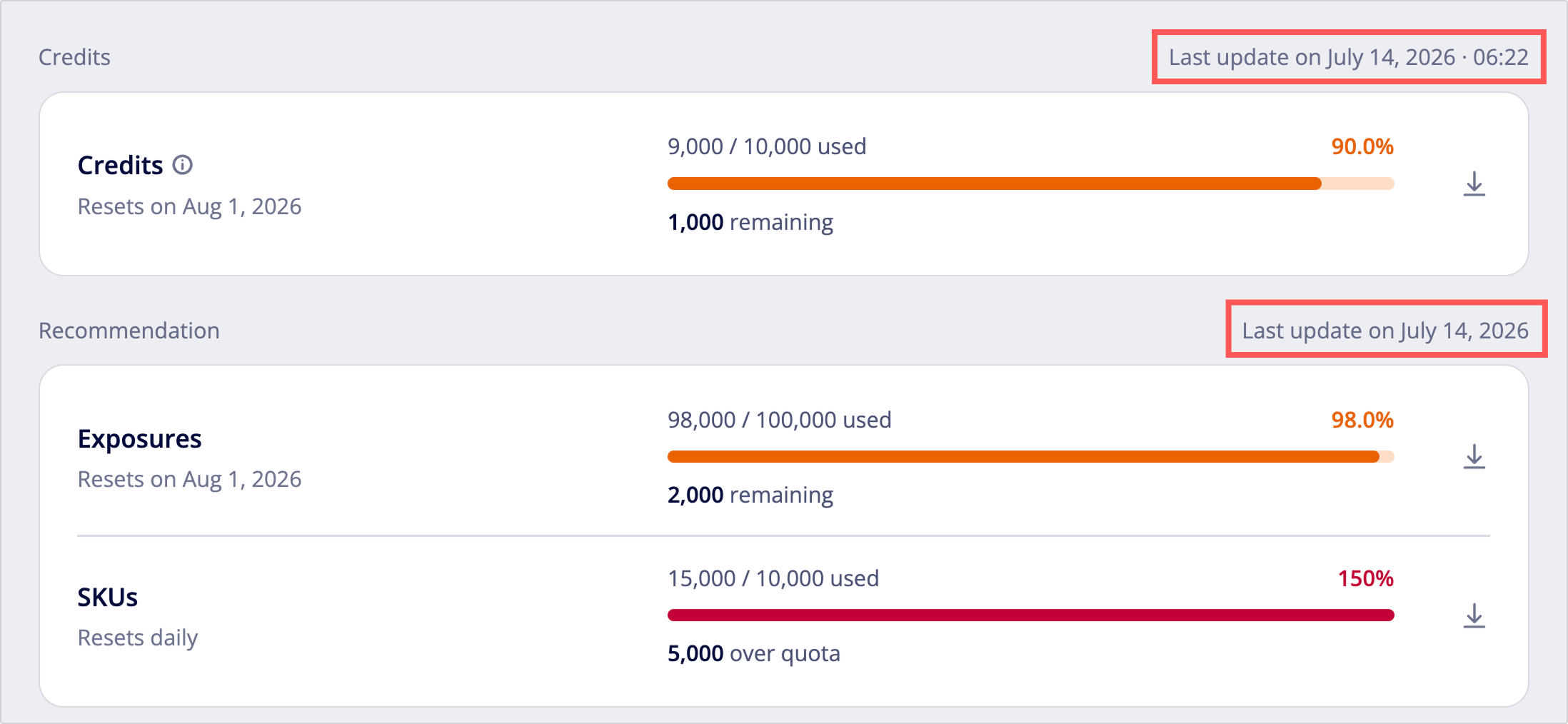
Downloading usage reportsClick the download icon on the right of the usage bar to download the detail records for that metric.

Quota refresh period
The label below each card tells you when the quota refreshes.
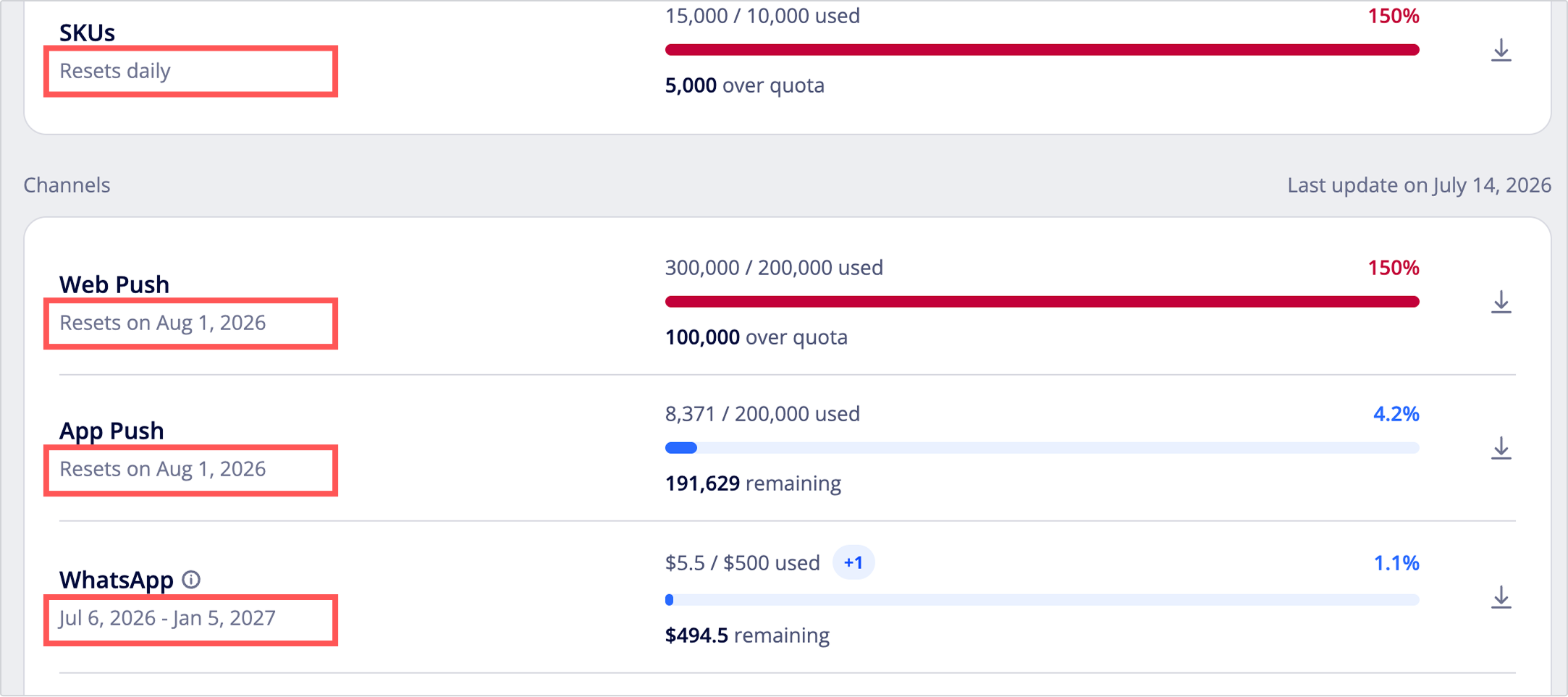
- Resets on [date]: On the specified date, usage resets to zero and a new quota cycle begins. This is commonly used for recurring monthly metrics such as credits, events, and MAU.
- Resets daily: Usage is recalculated every day.
- Date range, for example, May 1 – December 30, 2026: The quota is valid only within the specified period and doesn't follow calendar-month cycles. Any unused quota remaining at the end of the period expires. This is commonly used for channel messaging packages.
Credits
Credits are required for selected usage-based features in AIQUA and AIRIS, such as Appier AI Agent tasks, reports, and predictions.
- Credits are only consumed when you perform an action that requires them. For the full list of credit-charged actions and their costs, see Credit Usage.
- Credits reset at the start of each cycle, and the monthly credit allowance doesn't carry over to the next month.
Shared credit balanceIf you subscribe to both AIQUA and AIRIS, your credit balance is shared across both products as a single pool.
Users & data
This section shows engagement and data metrics based on how users interact with your brand across Appier's tracked touchpoints.
Monthly active users
Monthly active users (MAU) is the total number of distinct users who engage with or are reached by your brand at any touchpoint tracked by Appier at least once within a calendar month. MAU includes both anonymous and known, logged-in users.
A user counts toward your MAU only if they trigger or receive a qualifying event during the month, such as viewing or clicking an in-app campaign, viewing a recommendation, or opening an email. Users with no qualifying events don't count toward your MAU. Qualifying events are as follows:
notification_clickedqg_email_openedqg_email_clickedqg_inapp_clickedqg_inweb_clickedqg_line_clickrecommendation_clickedapp_launchedpage_viewednotification_sentqg_inapp_displayedqg_inweb_displayedrecommendation_impressionurl_clickclickclick_referral_urlsendpush
Recommendation
This section shows how the Recommendation module is being used, with two metrics: Exposures and SKUs. If recommendation usage exceeds your quota, you'll need to upgrade your plan.
Exposures
The Exposures metric shows the total number of times recommendations were requested, regardless of whether the user interacts afterward or how many items were contained in the recommendation.
SKUs
The SKUs metric shows the total number of products in your product feed that are available for the recommendation scenarios to train on and recommend. SKUs are recalculated daily to reflect the number of items in your product feed, allowing you to monitor how close you are to your SKU limit.
Channels
This section displays the usage for each messaging channel enabled for your organization. Message quota refreshes differently depending on the channel type.
- Monthly-refresh message (app push, web push, email): Refreshes on the first of each calendar month and expires at month end.
- Prorated months: For email, if your contract doesn't start on the first of the month, the quota for your first and last months is prorated. For example, if your contract starts on January 15 with a quota of 50,000 emails per month, your January quota would be about 25,000 and your quota from February onward is 50,000.
- Multiple contracts: If you have multiple email contracts, their quotas are combined and shown as a single monthly total.
- Prepaid message (SMS OTP, SMS and MMS, WhatsApp, Viber, LINE LON, Kakao Sangdam Talk): Refreshes after the displayed date range.
- Multiple packages: If you have multiple contracts, you can view all available contract packages from the dashboard, indicated by a +1 badge on the card. Usage and quota are displayed for one contract at a time. When the current contract's quota is fully consumed or the contract expires, the system automatically switches to the next available package.
SMS credits
SMS and MMS usage is shown as SMS credits. The dashboard shows the number of SMS credits used, not the number of messages sent. To see both, download the usage report, which includes the number of messages sent and the SMS credits used.
SMS credits are separate from the credits in the Credits section.
FAQs
How to read the dashboard
Credits
- Will I still consume credits if I don't run any campaigns this month?
- Are AIQUA / AIRIS credits the same as AdCreative.ai credits?
Users & data
- Why is the MAU number different from the AIQUA dashboard?
- Why did my MAU count decrease during the month?
- What happens if I delete a user profile?
Recommendation
Channels
How to read the dashboard
Where do I download detailed usage records?
To download detailed usage reports, click the download icon on the right of each section.
Credits
Will I still consume credits if I don't run any campaigns this month?
Credits are consumed only when you perform an action that requires them. If you don't execute any credit-charged operations, your credit usage for the month will be zero. Note that unused credit allowance doesn't carry over to the next month.
Are AIQUA / AIRIS credits the same as AdCreative.ai credits?
No. They're independent credit systems on different products and can't be combined, transferred, or converted.
Users & data
Why is the MAU number different from the AIQUA dashboard?
The organizational usage dashboard shows user-based MAU, while the AIQUA dashboard shows device-based MAU. Because the two dashboards use different counting methods, their numbers may differ.
Why did my MAU count decrease during the month?
The count may decrease when user profiles are merged. For example, two profiles may initially be counted as separate users but later be linked through a shared identifier. Once merged, they count as one MAU.
What happens if I delete a user profile?
Any resulting change to the MAU count will be reflected in the next billing cycle.
Recommendation
What happens if I exceed my recommendation quota?
Once you exceed your quota, model training will reduce from daily to weekly training, impacting recommendation performance. To restore optimal performance with daily model training, you'll need to contact your customer success manager to upgrade your plan.
Channels
What happens to unused messages?
Unused messages don't carry over, and any remaining balance isn't refundable.
- Monthly-refresh channels (app push, web push, email): Unused quota expires at the end of each calendar month.
- Prepaid channels (SMS OTP, SMS and MMS, WhatsApp, Viber, LINE LON, Kakao Sangdam Talk): Packages operate on their own validity window, not the calendar month. Unused messages don't carry into the next package, and any remaining balance at the end of the contract is forfeited.
Updated 13 days ago